A mileage logbook for the CRA, kept by your phone
What the Canada Revenue Agency asks a vehicle logbook to hold, and how Dually Trip Tracker records it. This page explains the record; it is not tax advice. Ask your accountant how the rules apply to you.
What the CRA asks for
To claim vehicle expenses for business, the CRA asks you to keep a logbook of your business driving. For each business trip it lists four things:
- the date,
- the destination,
- the purpose, and
- the number of kilometres you drive.
It also asks you to record each vehicle's odometer reading at the start and the end of the fiscal period. The CRA explains this on its page Motor vehicle records, which also describes a simplified logbook: one full year as a base year, then a three-month sample in later years, as long as your use stays within the same range.
How Dually keeps each of them
- Date: every trip is recorded with its date and its start and end times.
- Destination: the start and end of each trip are turned into street addresses ("10103 104 Avenue Northwest, Edmonton"), and you can type or correct one.
- Purpose: each trip can have a label, which Dually suggests from where the trip ended and prints on the report as its purpose.
- Kilometres: each trip's distance, measured with GPS, in kilometres or miles.
- Business or personal: trips in your work hours are saved as Business, the others as Personal, and you can change any of them.
- Odometer: you type each vehicle's odometer reading in Settings, and the report prints the reading at the start and the end of its period.
The report
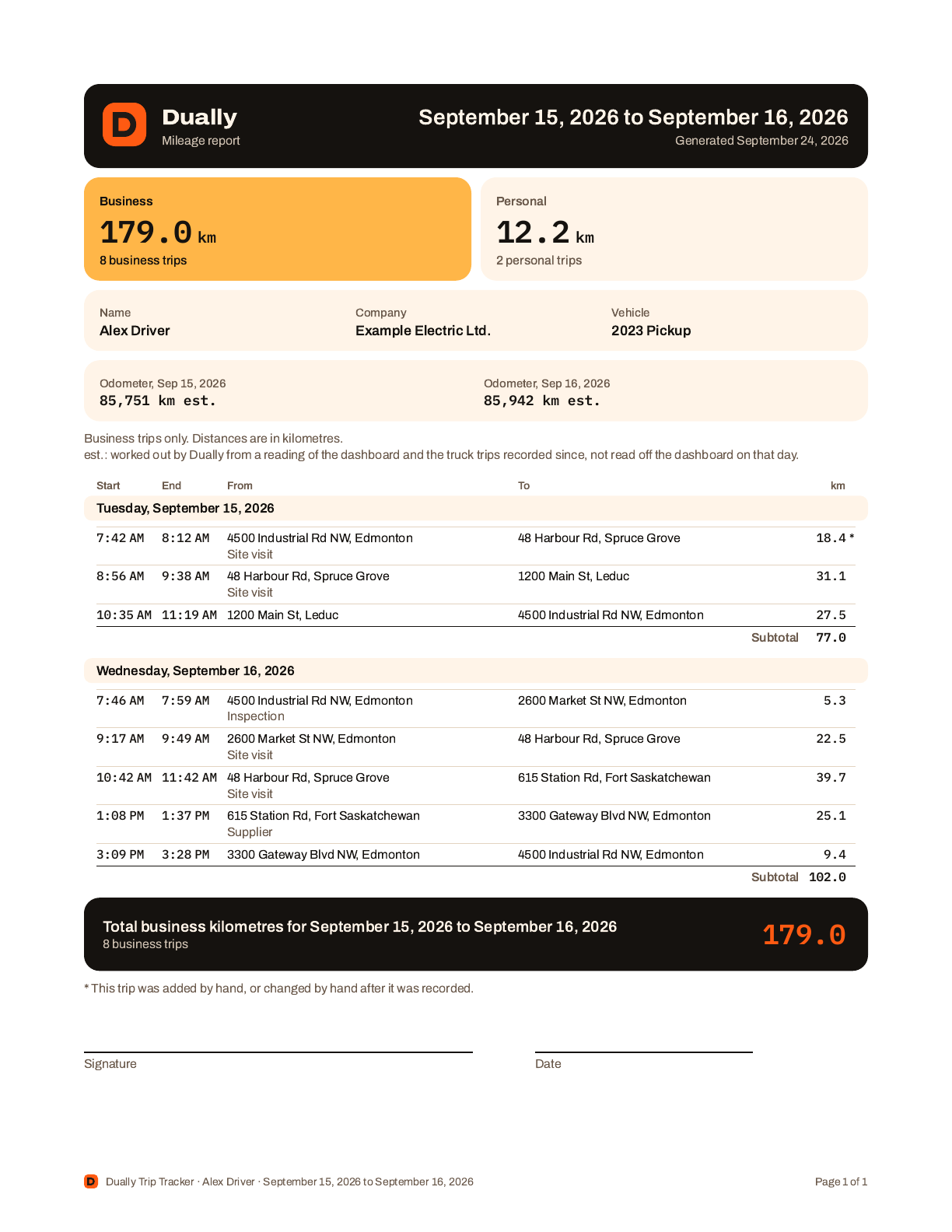
For a month or any range of days, a whole year included, Dually makes a PDF and a CSV file: one table per day with each Business trip's start and end times, from and to addresses, purpose and kilometres, a subtotal per day, the total, the Business and Personal kilometres at the top, and a line to sign. A trip you added or changed by hand is marked. Dually opens your email app with the PDF attached to your accountant, and keeps a list of the reports you sent.
Keep in mind
- A log is only as good as its coverage: check the Trips screen now and then, and add a trip Dually missed.
- Keep your reports. The CRA asks for records to be kept for six years, and longer for a base-year logbook still in use.
- Your trips live on your phone. Export them now and then (Settings, Export all data) to keep a copy somewhere safe.
Try it
Dually is free for Android 14 or newer and for iPhone with iOS 16 or newer, with no ads, no subscription and no account needed. Get Dually on Google Play or on the App Store, see how to install it, or read the other guides: Bluetooth mileage tracking and a private mileage tracker.